Custom facts
Configuration flags
Two configuration flags are available:
| Parameter | Default | Description |
|---|---|---|
useFactsApi | false | Enables or disables the external API |
userContentReplaces | false | Whether user-defined facts completely replace the local database |
Behavior overview
During mod initialization, configuration directories are automatically created in the config folder - one folder per supported language, thirteen in total, each with the five category files.
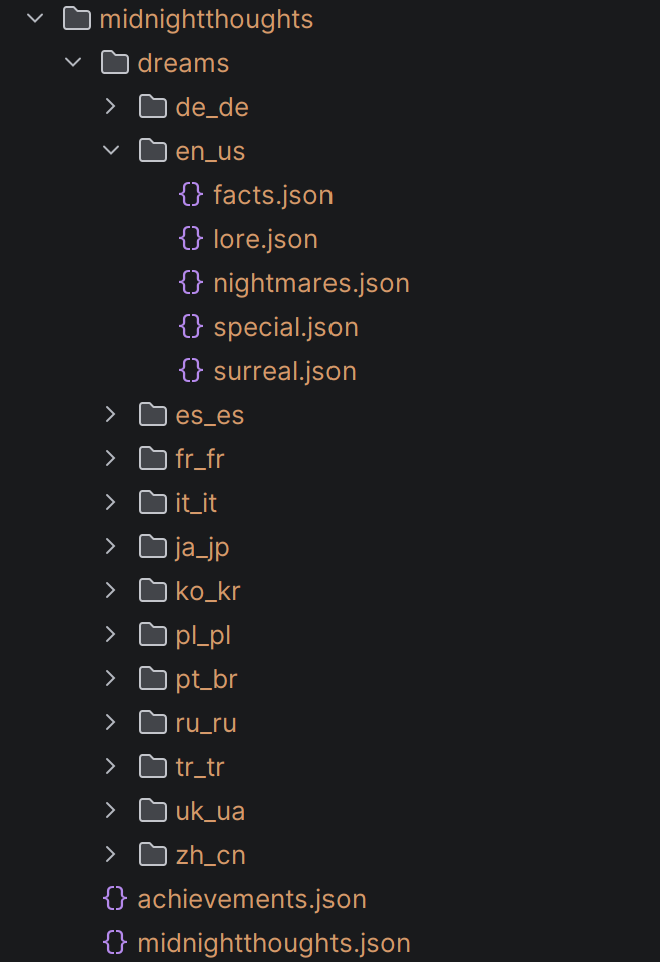
Custom facts can be added to these directories. By default, they are appended to the existing local database.
You only need to fill in the languages you care about. A player whose language has no custom entries simply sees the built-in database, with no warning and no fallback to another language's custom content.
If userContentReplaces is set to true, all local database facts are fully replaced with user-defined content.
If replacement is enabled (userContentReplaces: true), but no custom facts are provided in at least one category, that category will be automatically populated with entries from the local database.
File format
- One entry
- Several entries
{
  "entries": [
    { "text": "Text example", "rarity": 1.0 }
  ]
}
{
  "entries": [
    { "text": "First fact", "rarity": 1.0 },
    { "text": "Second fact", "rarity": 1.0 },
    { "text": "A rare third fact", "rarity": 0.2 }
  ]
}
Every entry except the last one must end with a comma. Without it the file is not valid JSON and is skipped completely. The last entry must not have a comma after it.
| Field | Description |
|---|---|
text | The fact content |
rarity | Defines how frequently the entry appears (rarity weight) |
An entry with a missing or empty text is skipped. A missing or non-positive rarity is treated as 1.0, so you can leave it out entirely if you do not need weighting.
Limits
Custom content is sent from the server to every client that joins, so there are two ceilings to keep that from becoming a problem:
| Limit | Value | What happens past it |
|---|---|---|
| Length of one entry | 4096 characters | The entry is skipped, and the server log says how many were skipped and in which file |
| Total custom content | 512 KB | Delivery stops at that point and the log tells you which language and category it stopped on |
These are generous - 512 KB is far more text than any player will read in a lifetime of nights. The limits exist so that a malformed or auto-generated file cannot stall every player's login.
A file that is not valid JSON is reported in the log and skipped. The rest of your custom content still loads - one broken file does not take the others down with it.
Applying changes
You do not have to restart the server after editing your files:
/midnightthoughts reload content
This re-reads every language folder, recreates any default files you deleted, and refreshes the content sent to players. See commands.